CC Watch: Claude Code on My Wrist — Building a Garmin Watch Face for AI Agents
In the last post I bridged my Claude Code sessions to every chat app I live in, so leaving the computer never means leaving the work. That system has one blind spot left: the moments when even a phone is too much. Swimming. Driving. A meeting where pulling out a phone says I have stopped listening to you.
But I wear a watch in all of those places. A Garmin Descent G2 — a dive computer, because I dive. It has a developer SDK. You can see where this is going.
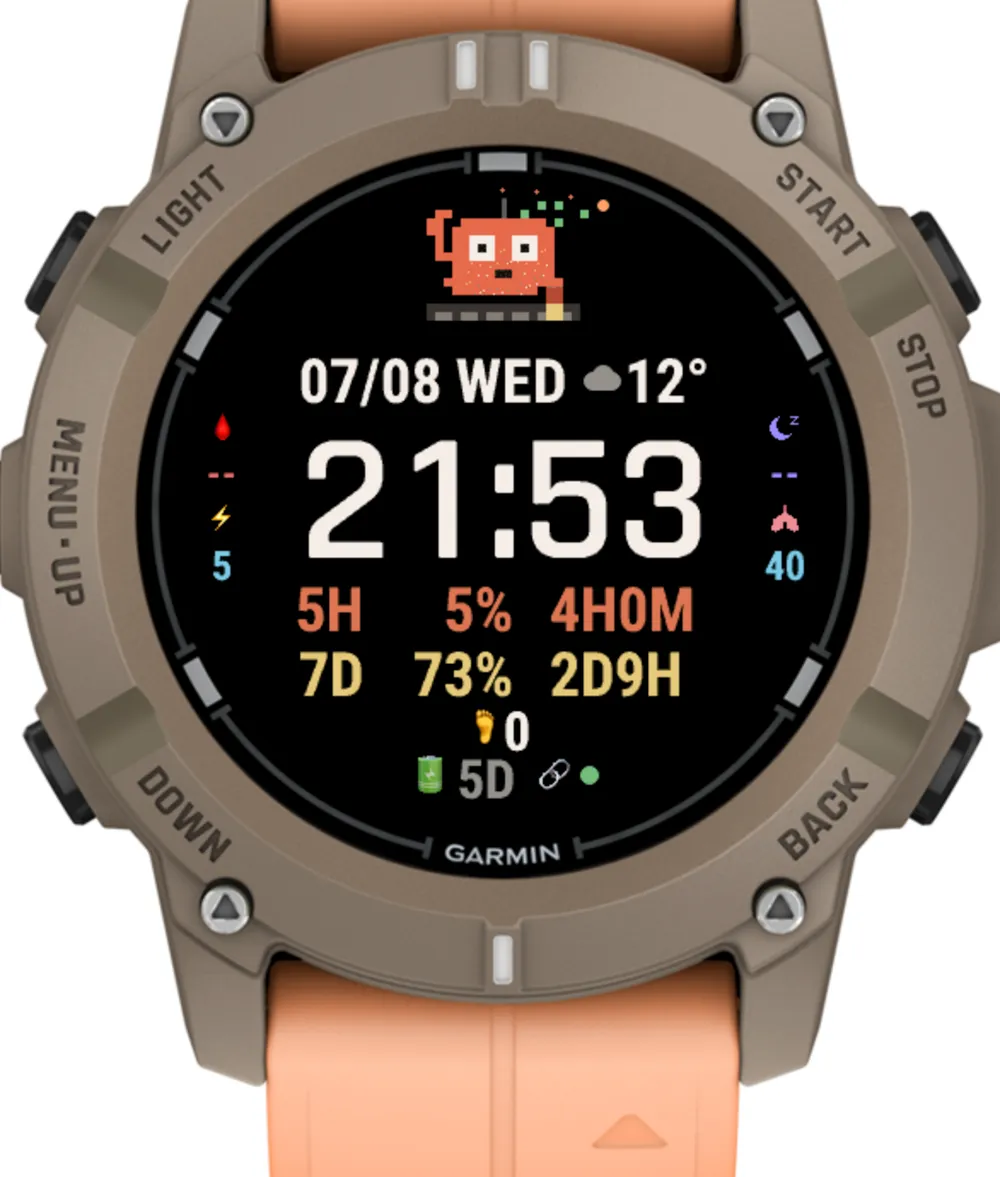
This post is about CC Watch, a watch face that shows my Claude Code world at a glance: how much of my subscription window is left, whether any agent is busy right now, and — the part everyone asks about first — a pixel-art crab that drums away while my agents work and just blinks at me when they’re idle. It went from empty project to Connect IQ store submission in four days, and taught me more about debugging a screen strapped to a wrist than I expected to learn.
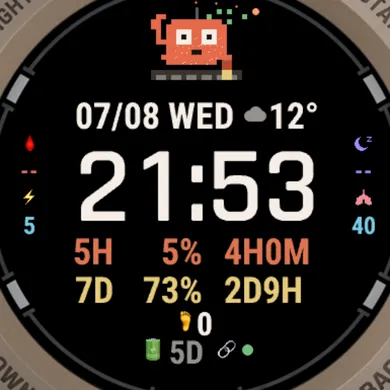
The dial, deliberately dense: date and weather up top; the two Claude subscription windows in the middle (5H 12% 3H33M — five-hour window, 12% used, resets in 3h33m; 7D 64% 2D13H — same for the weekly window); health data around the rim — blood oxygen, sleep, body battery, VO2max, steps; a data-link light (green = fresh, red = stale); and the crab.
No notifications. On purpose.
The obvious way to put an agent on a watch is notifications — every push the phone gets, mirrored to the wrist. I already have that for the final “task done, come approve” ping, and it’s exactly right for that one moment.
For everything else it’s wrong. A fleet of agents produces a lot of intermediate news, and a watch that buzzes for intermediate news gets taken off. Worse, streaming notifications to a watch all day murders the battery — on a dive watch I charge once a week, that’s a dealbreaker.
So CC Watch never receives anything. It pulls: a background job wakes every ten minutes, makes one HTTPS request, stores one small JSON blob, and goes back to sleep. The watch face reads whatever the last blob said. Glanceable, silent, and cheap enough that I can’t find it in the battery graph.
The philosophy is the same one that shaped the bridge: the agent reports, I glance. Nothing on my wrist ever demands attention; it just answers the question I was about to ask — is anything running? do I have quota left for a big refactor tonight?
The plumbing: one endpoint, ten minutes, 390 pixels
The data path is short, because most of it already existed:
Descent G2 (Monkey C, background service, every 10 min)
    └── HTTPS GET  https://<my-cloud-ip>/watch?token=…
            └── hub server on the Mac mini (via SSH reverse tunnel)
                  ├── Claude Code statusline cache  → usage windows
                  ├── tmux capture probes           → per-project busy/idle
                  └── Garmin cloud sleep snapshot   → (yes, really — see below)
The hub is the same little aiohttp server that powers my web cockpit; /watch is just one more route that flattens everything the watch needs into a tiny JSON payload. It authenticates with its own dedicated token — separate from the web password gate, so a leaked watch token can read a usage number and nothing else.
Two constraints made this less trivial than it sounds:
Garmin requires HTTPS for background requests, and my endpoint is a bare IP — the domain is still stuck in ICP-filing purgatory (a China-hosting story for another post). The fix was something I didn’t know existed until this week: Let’s Encrypt now issues certificates for IP addresses. acme.sh gets a cert for the raw IP and renews it every six days on a timer. No domain, valid HTTPS, watch satisfied.
The screen is 390×390 and I use all of it. Every element is laid out pixel-by-pixel against the round bezel — which is also why, when the store submission form asked “support automatic migration to new devices?”, I said no. On a face this dense, “approximately correct” layout on some future 416×416 screen means wrong.
The crab
A dial full of numbers answers questions, but you still have to read it. I wanted the busy/idle answer to be preattentive — visible before conscious thought, the way you notice motion in peripheral vision.
So: a pixel-art crab, drawn frame by frame, living at the bottom of the dial. When any project is busy (the face shows a ✻ and a count), the crab drums its claws — left, right, left, right, one beat per second. When everything is idle, it sits there and occasionally blinks. My wife’s verdict on first seeing the busy animation was, quote, “wow, the alien is drumming” — which I choose to read as a successful preattentive design and not a comment on my pixel art.
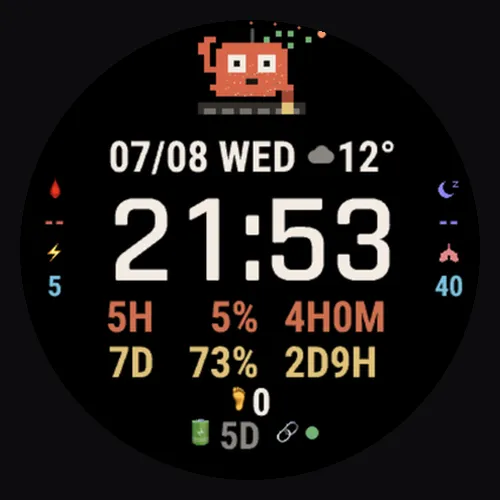
The mascot. One glance from across the room: claws moving = agents working, blinking = all quiet. The outermost ring is a seconds indicator — an orange dot that only walks while the watch is in high-power mode, which turned out to be an accidental debugging tool.
The crab also taught me the week’s cheapest lesson. On the real watch it seemed frozen — the animation worked in the simulator, so I went hunting for a rendering bug. There wasn’t one. Watch faces only get once-per-second redraws in high-power mode (the few seconds after you raise your wrist); the rest of the time they redraw once a minute. And in my “bug” sightings, busy was simply zero — an idle crab is supposed to sit still. The fix was epistemic, not technical: that seconds-dot on the outer ring now tells me instantly which power mode I’m looking at, and I’ve stopped diagnosing animation bugs from memory. Observe first, then theorize.
Five versions before lunch
Simulators lie, gently. The Descent G2 simulator renders the face on a perfect white-backed disc; the real watch is a dimmer OLED behind curved glass on a moving wrist, and the difference eats designs alive. July 8th went: v5.0 sideloaded → too cramped at the edges → v5.1 → the seconds ring collides with the bezel → v5.2 → rebalance the whole ring geometry (chord math, not eyeball) → v5.3 → “wow, the alien is drumming” → v5.4, ship candidate. Five versions, one day, each one a .prg copied onto the watch over a cable.
There’s no substitute for the physical loop. My rule by the end: the simulator is for logic, the wrist is for design, and any pixel decision made without raising an actual arm is provisional.
The API that lied by omission
The best story in this build is the sleep field.
The dial shows last night’s sleep. Garmin’s Connect IQ SDK offers a Complications API — a typed catalog of data the watch can serve to faces: heart rate, body battery, VO2max, and, per the documentation, sleep time. My code asked for COMPLICATION_TYPE_SLEEP_TIME, defensively, exactly the way the samples do. It compiled. It ran. It displayed --, forever.
The usual suspects went first: maybe the value comes back as a Float and my instanceof Number check drops it (a real bug I’d hit weeks earlier — Monkey C numerics come in four types and instanceof Number silently rejects three of them). Hardened that. Still --. Maybe it’s in seconds, not minutes. Guarded that. Still --.
Then I did what I should have done first: read the device’s own API manifest — every Garmin model ships an XML file describing what it actually implements. The Descent G2’s complication enum lists 37 entries. Body battery: present. Pulse ox: present. Recovery time, respiration, stress, training status: present. Every sleep-related complication: absent. Not broken — absent. The watch tracks my sleep every night, shows it in the phone app, syncs it to Garmin’s cloud… and simply does not offer it to watch faces on this model. Newer flagships do. Mine doesn’t, and no amount of correct code changes that. has :COMPLICATION_TYPE_SLEEP_TIME was returning false the entire time; my defensive check was faithfully hiding a platform gap.
The workaround is honest, if absurd: the Mac mini logs into Garmin’s cloud every thirty minutes and asks for the sleep data my watch uploaded, then hands it to the hub, which serves it back to the very watch that measured it. My sleep now commutes through two data centers to travel zero meters.
(One China-specific landmine for anyone copying this: the popular garminconnect Python library half-supports Chinese-region accounts — SSO succeeds against garmin.cn, then it exchanges tokens against the international domain and dies behind the wall. Going straight to the lower-level garth library with configure(domain="garmin.cn") works. Tokens cache; the password is touched once.)
Debugging a screen you can’t attach to
Mid-week, the data-link light went red for two hours and I got to practice remote-debugging a wrist. The nginx logs said the watch was fetching /watch every ten minutes, status 200, like clockwork. The watch said the data was stale. Both were telling the truth: the fetch succeeded, and somewhere between the phone’s Garmin agent and the watch’s storage, the result evaporated. It healed itself two hours later and hasn’t recurred.
You can’t tail -f a watch face. What you can do is make the face carry its own black box: the current build shows three tiny diagnostic digits whenever the link light is red — the HTTP code the watch itself saw, the last error code, and minutes since the background job last woke. Next time the light goes red, one photo of my wrist is a full bug report. Design for the failure you can’t reproduce, because it will happen again the week you stop looking.
From sideload to store
For the first three days CC Watch was a .prg file on a USB cable — fine for me, useless for anyone else. Getting it store-ready was its own small project:
- Secrets out of the binary. My endpoint URL and token were compile-time constants. The store build reads both from a settings page (Garmin’s Properties API), editable in the Connect Mobile app after install. A
build_store.shflavor script ships the store package with the token field blank — my own sideloaded build keeps the baked-in convenience. - The companion, open-sourced. The watch face is useless without an endpoint, so the reference server is now a public repo: a single-file, stdlib-only Python server that reads Claude Code’s local usage cache and serves the
/watchJSON. No pip installs, no framework —python3 ccwatch_companion.pyand a token, and any Claude Code user can point the face at their own machine. - Store listing: name, category (they have a “Geek” category, which, fair), five screenshots, a hero image of the crab. Submitted July 8th at 23:37 — and approved in under two days. CC Watch is live on the Connect IQ store: the crab now drums on wrists other than mine.
What’s next
Two things, both already in motion.
A dive face. This watch is a dive computer and half my friends who’d install anything from me are divers. Same architecture, different soul — and a chance to find out what of the ocean the platform actually exposes to faces (I have learned to check the manifest first now).
Closing the loop with the agents. Right now the watch face has users other than me only in theory; once the store listing is live, real users means real bug reports. The plan is to wire the feedback entrance straight into the system this blog keeps describing: a bug report lands, a message wakes a Claude Code session, the session reproduces the issue against the codebase, drafts a fix, and pings my wrist for a one-word approval. The watch that displays the agents becomes the watch that approves their work. That’s the post I actually want to write.
CC Watch is on the Connect IQ store; the companion server is on GitHub. If you build watch faces for a living and winced at anything above — the crab and I welcome your bug reports.